Guide · ATEM Mini family
Control your ATEM Mini from an Android phone or tablet
Updated
Short answer
Yes, you can. Blackmagic's ATEM Software Control runs on Mac and Windows only, so on Android you use a third-party app such as ProSwitcher, the Android control app for ATEM switchers. The ATEM Mini stays wired to your router by Ethernet; your phone joins that network over Wi-Fi and controls the switcher directly, with no computer in between.
Get it on Google Play Free for switching · Android phones and tablets · iPhone and iPad coming soon
“ATEM Mini and a phone” can mean three things
- The phone as the internet connection. Blackmagic's ATEM Mini page describes connecting an Apple or Android smartphone to the USB port to use mobile data for streaming. That is about streaming, not control.
- The phone as a camera. Feeding a phone's video into one of the HDMI inputs. Also not what this page covers.
- The phone as the control surface. Switching, keying and mixing the ATEM Mini from your hand. That is what ProSwitcher does, and what the rest of this page is about.
What you need
- An ATEM Mini, Mini Pro, Mini Pro ISO, Mini Extreme or Mini Extreme ISO.
- A router or Wi-Fi access point, and an Ethernet cable from the switcher to it. The ATEM Mini has Ethernet but no Wi-Fi.
- An Android phone or tablet running Android 7.0 or later, on that router's Wi-Fi.
- ProSwitcher from Google Play. Switching is free.
Set it up in three steps
Wire the ATEM Mini to your router
Use a LAN port on the router, not its internet (WAN) port.
Join your phone to the same network
Same Wi-Fi, same subnet: if the router hands out 192.168.1.x addresses, the switcher needs a 192.168.1.x address too. Avoid guest networks, which usually stop devices seeing each other.
Open ProSwitcher and tap your switcher
The app scans your local network and lists the ATEMs it finds. Tap one, or type its IP address under Manual IP. It saves the switcher and reconnects automatically after a dropout.
Stuck? The Wi-Fi setup guide covers IP addresses, travel routers and what to check when the app cannot find the switcher.
What each ATEM Mini model has
ProSwitcher shows the panels your switcher reports, so what you can control depends on the model. These figures are Blackmagic Design's own.
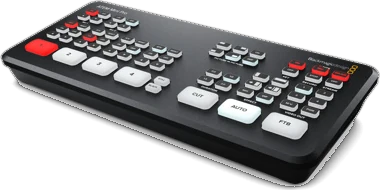
ATEM Mini Pro 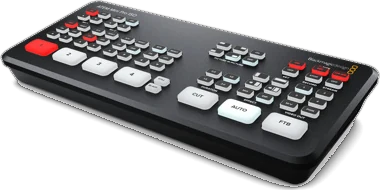
ATEM Mini Pro ISO 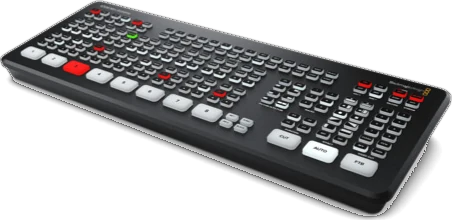
ATEM Mini Extreme 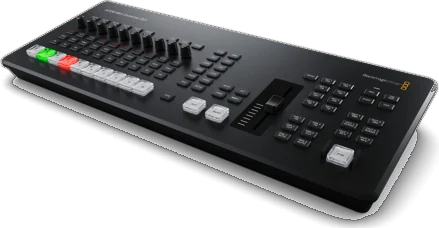
ATEM Mini Extreme ISO G2
Product photos © Blackmagic Design.
| Model | Inputs | USK | DSK | DVE | Media players | Multiview | Audio mixer |
|---|---|---|---|---|---|---|---|
| ATEM Mini Pro | 4 HDMI | 1 | 1 | 1 | 1 (20 stills) | 1 × 10 views | 6 inputs × 2 channels, Fairlight |
| ATEM Mini Pro ISO | 4 HDMI | 1 | 1 | 1 | 1 (20 stills) | 1 × 10 views | 6 inputs × 2 channels, Fairlight |
| ATEM Mini Extreme | 8 HDMI | 4 | 2 | 2 | 2 | 16, 13, 10, 7 or 4 views | 11 inputs × 2 channels, Fairlight |
| ATEM Mini Extreme ISO G2 | 8 HDMI | 4 | 2 | 2 | 2 | 16, 13, 10, 7 or 4 views | 26 inputs × 2 channels, Fairlight |
Source: Blackmagic Design ATEM Mini tech specs, checked 26 September 2026. USK: upstream keyers. DSK: downstream keyers. The original ATEM Mini and the first ATEM Mini Extreme ISO are no longer on that page.
What ProSwitcher controls on an ATEM Mini
- Free: program and preview, live tally, Cut, Auto, the T-bar, Fade to Black, saved switchers and automatic reconnect.
- Pro: upstream keyers (luma, chroma including advanced chroma, pattern and DVE), downstream keyers, transitions including DVE transitions, media players (browse, upload stills from your phone, capture a still from program), macros, aux routing and the colour generators.
- Picture-in-picture (Pro): size and place the DVE box with position presets or by dragging it, with border, shadow, mask and the flying key.
- Fairlight audio (Pro): the ATEM Mini family uses the Fairlight audio mixer. ProSwitcher gives you faders, meters and mute or AFV per channel, and the 6-band EQ, dynamics and mic delay.
- Streaming (Pro), on models with a built-in streaming encoder: go on air and off from the switcher's own encoder, watch duration, bitrate and cache, and set the platform, server and key.
- Recording (Pro), on models that record: REC and STOP with the running time, disk space and disk switching, and ISO recording on the ISO models.
- Multiview (Pro), on models with a multiview: route every window, split or join each quadrant, and set labels, borders, VU meters and 16:9 or 9:16 frame guides.
- SuperSource (Pro): on the ATEM Mini Extreme models, which list it; presets that animate from one layout to the next, and a live canvas for position, size, crop and art.
Every one of these panels opens in the demo switcher, with no purchase and no trial, so you can see how each works before you connect your ATEM Mini.
Which ATEM Mini have we tested?
We develop and test on an ATEM Mini Extreme ISO, and also test on an ATEM Production Studio 4K. The other ATEM Mini models use the same ATEM Ethernet control protocol and the app adapts its panels to each one, but we have not tested them ourselves yet. If you run ProSwitcher on one, tell us how it went at support@proswitcher.app.
The original ATEM Mini
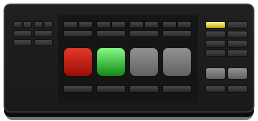
The first ATEM Mini uses the same control protocol. Its manual lists a fixed factory address of 192.168.10.240. If your router hands out a different range, a phone on that network cannot reach it: change the switcher's address to match your network in Blackmagic's ATEM Setup over USB.
Questions
Can I control an ATEM Mini from an Android phone?
Yes. Install ProSwitcher from Google Play and join your phone to the same network as the switcher; the app finds the ATEM automatically, or connects to the IP address you type in. The ATEM Mini stays wired to your router by Ethernet, and only the phone is on Wi-Fi.
Does the ATEM Mini have Wi-Fi?
No. ATEM switchers connect to a network by Ethernet only. Wire the switcher to a router or access point, then join your phone or tablet to that network's Wi-Fi.
Can I use ProSwitcher alongside ATEM Software Control or a hardware panel?
Yes. An ATEM accepts several control connections at the same time, so ProSwitcher can run next to ATEM Software Control, a hardware panel or another phone, and every one of them shows the same live state.
How much does ProSwitcher cost?
Switching is free forever: discovery, program and preview, live tally, Cut, Auto, the T-bar, Fade to Black and the demo switcher. ProSwitcher Pro is a one-time US$39.99 in-app purchase that adds keyers and picture-in-picture, transitions, media players, the audio mixer, SuperSource, streaming, recording, multiview, macros, aux routing and the colour generators.
Can I try it without an ATEM?
Yes. Tap “Try the demo switcher” on the first screen and the app runs against a complete simulated switcher, with eight cameras, keyers and picture-in-picture, SuperSource, media players, Fairlight audio, streaming, recording and a multiview, entirely on your device. Every panel opens in the demo with no purchase and no trial, and its ON AIR and REC go nowhere.
Put ProSwitcher on your phone before the next show.
Free on Google Play for Android phones and tablets. Switching stays free; Pro is a one-time US$39.99, with a 14-day free trial.
Related
Wi-Fi setup guide
The ATEM has no Wi-Fi. How to wire it so your phone can still run the show.
Supported switchers
Every ATEM family, what each model has, and what we have tested.
Demo switcher (ATEM simulator)
A simulated eight-camera ATEM on your phone, for practice and training.
ATEM Software Control on Android?
There is no official Android version. What works instead.